A Developer's Guide to Building Cross-Platform Apps with Security
Published on FinClip Tech Blog | Target: Mobile Developers
Table of Contents
· 1. Introduction: The Cross-Platform Dilemma
· 2. What is a Mini-App Container?
· 3. The Technical Core: Dual-Thread Architecture
· 4. Cross-Platform Comparison
· 5. Security: The Sandbox Advantage
· 6. Real-World Use Cases
· 7. Conclusion: When to Choose Mini-App Container
1. Introductio
A Developer's Guide to Building Cross-Platform Apps with Security
Published on FinClip Tech Blog | Target: Mobile Developers
Table of Contents
· 1. Introduction: The Cross-Platform Dilemma
· 2. What is a Mini-App Container?
· 3. The Technical Core: Dual-Thread Architecture
· 4. Cross-Platform Comparison
· 5. Security: The Sandbox Advantage
· 6. Real-World Use Cases
· 7. Conclusion: When to Choose Mini-App Container
1. Introduction: The Cross-Platform Dilemma
Every mobile developer faces the same dilemma: how to build once and deploy everywhere without sacrificing user experience. The landscape is crowded with options—React Native, Flutter, PWA, H5, and now mini-apps. Each claims to solve the problem, but which one actually delivers?
This article dives deep into mini-app container technology—what it is, how it works, and why it might be the elegant solution you've been looking for.
2. What is a Mini-App Container?
Think of a mini-app container like a standardized shipping container in logistics.
Just as shipping containers have uniform dimensions so ships, trains, and trucks can transport them interchangeably, a mini-app container provides a consistent runtime environment for applications across different platforms. The same container (and its contents) works whether it's running on iOS, Android, Windows, Mac, or Linux.
Key Advantages of Container Architecture
Container Analogy
Mini-App Reality
Same dimensions = predictable handling
Consistent API behavior across platforms
Packaged goods protected during transport
Sandboxed execution for security
Easy to stack and organize
Modular app management
Standardized globally
WeChat mini-app syntax compatibility
3. The Technical Core: Dual-Thread Architecture
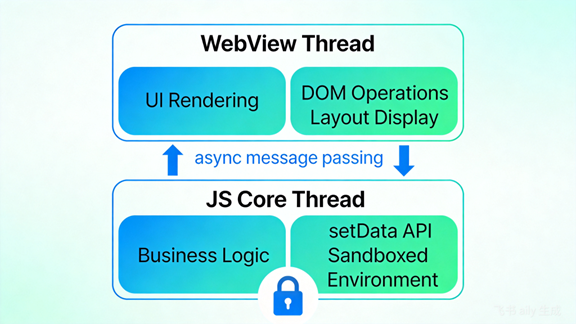
Unlike traditional web apps, mini-apps use a dual-thread architecture that separates rendering from business logic:
WebView Thread (Rendering)
· Handles UI rendering using WebView
· Manages DOM operations and layout
· Runs independently from logic
JavaScript Core Thread (Logic)
· Executes application logic in a sandboxed JS environment
· Does NOT have direct DOM access
· Communicates with the rendering thread via setData()
Why Does This Matter?
Traditional H5 apps suffer from a fundamental problem: rendering and scripting compete for the same thread. Heavy DOM manipulation blocks user interactions. Mini-app's dual-thread design decouples these concerns, resulting in buttery-smooth performance comparable to native apps.
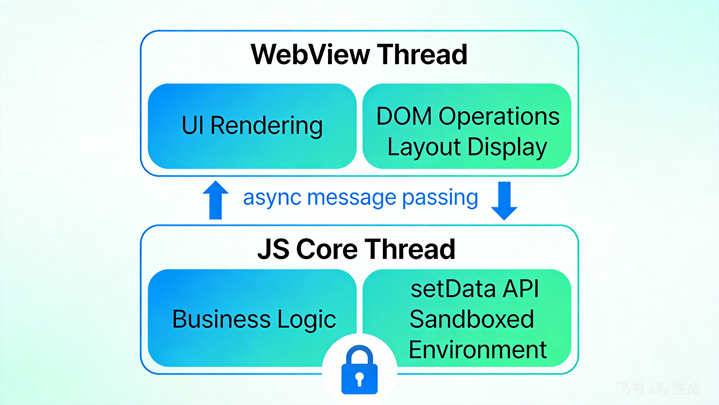
Figure 1: Mini-App Dual-Thread Architecture
4. Cross-Platform Comparison
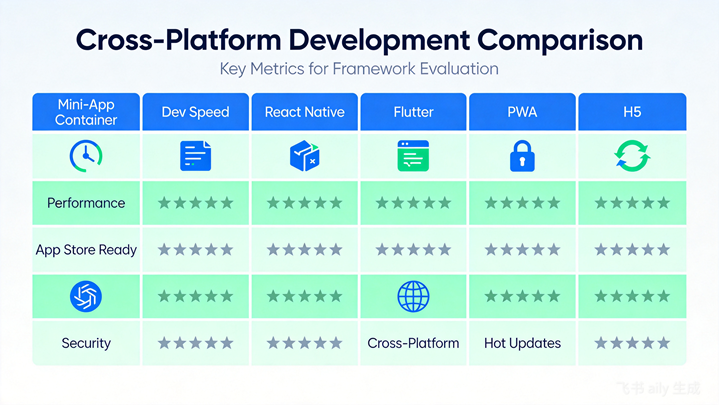
Here's how mini-app containers compare with other cross-platform approaches:
Feature
Mini-App
React Native
Flutter
PWA
H5
Performance
Near-native
Near-native
Native
Medium
Low-Medium
Dev Speed
Very Fast
Medium
Medium
Fast
Very Fast
App Store
Yes
Yes
Yes
No
No
Cross-Platform
iOS, Android, PC, IoT
iOS, Android
iOS, Android, Web
Web only
Web only
Security
Sandboxed
Native permissions
Native permissions
Browser sandbox
Browser sandbox
Figure 2: Cross-Platform Solutions Comparison
5. Security: The Sandbox Advantage
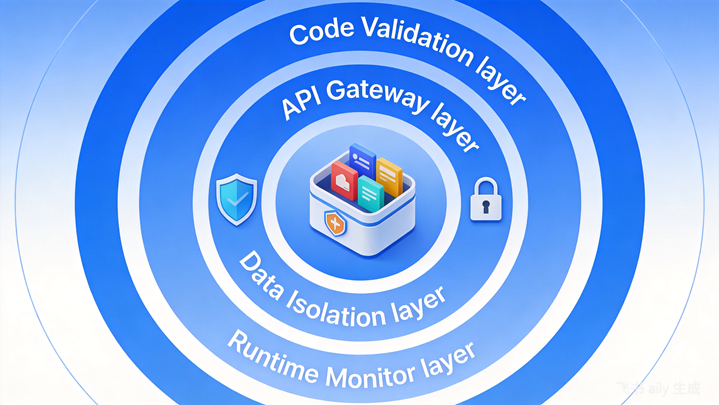
Security is where mini-app containers truly shine. The sandbox technology provides critical protections:
1. Boundary Enforcement
Like a child's sandbox with wooden borders, the container defines clear boundaries. Code running inside cannot access resources outside without explicit permission.
2. One-Click Cleanup
Everything in the sandbox can be wiped instantly—no lingering data, no residue. This is crucial for shared device scenarios, multi-tenant applications, and privacy-sensitive operations.
3. Fine-Grained Isolation
Mini-apps are isolated from each other AND from the host app. A malicious mini-app cannot:
Automotive Industry: Car manufacturers embed mini-app containers in vehicle infotainment systems. Developers create apps for navigation, music, weather, and services—without car OEMs modifying native code.
Banking & Finance: Banks run mini-apps for account management, payments, and customer service within a secure container. Compliance requirements are met without compromising user experience.
Enterprise Mobility: Organizations deploy custom mini-app ecosystems. Employees access internal tools, forms, and approvals—all managed centrally, all secure.
IoT Devices: Smart TVs, wearables, and IoT gateways gain app capabilities through lightweight containers, extending functionality without native development overhead.
7. Conclusion: When to Choose Mini-App Container
Mini-app container technology is ideal when you need:
It's less ideal for apps requiring deep hardware integration, heavy graphics processing, or completely custom UI paradigms.
The bottom line: Mini-app containers offer a unique balance of development efficiency, cross-platform reach, and security that's hard to match with traditional approaches.
Ready to explore mini-app development?
Get started with FinClip SDK
Word count: ~980 words | Tags: Mini-App, Cross-Platform, Mobile Development, Security, Sandbox